Gemma 4 12B IT QAT
13 workload results across 2 hardware configurations.
For a standard Q4_0 quantization using llama.cpp, here are measured results for short-chat generation.
On llama.cpp Q4_0, gemma-4-12b-it-qat is fastest on the RTX 5090 at 139.5 tok/s, 43% faster than the RTX 4090 (97.72 tok/s).
| Card | Decode tok/s | Run |
|---|---|---|
| RTX 5090 | 139.5 (median of 3 runs) | r_c2podhe9qwc (closest to median) |
| RTX 4090 | 97.72 (single run) | r_jfh0qkngw76 |
gemma-4-12b-it-qat, Q4_0, llama.cpp, chat-short, batch 1. Only cards with their standard memory are listed; CPU-only hosts are excluded. Runs use different llama.cpp versions (RTX 5090: 1 (9725a31); RTX 4090: 8931 (9725a313b)), so treat this as measured reference points, not a controlled ranking.
Original test · 5 September 2026 · three repetitions
How fast is Gemma 4 12B IT QAT on an RTX 5090?
We measured 139.5 tokens per second in short chat with Q4_0 quantization, using one RTX 5090 with 32 GB VRAM and llama.cpp. Median time to the first token was 59.7 ms with the model already loaded. These are single-user, thinking-off results.
| Workload | Decode tok/s | First token (ms) | Prompt tokens | Output tokens |
|---|---|---|---|---|
| chat-short | 139.5 (137.3–141.1) | 59.7 (52.2–61.8) | 121 | 256 |
| chat-long | 135.6 (135.6–137.1) | 619.3 (577.2–622.9) | 3,188 | 620 |
Does it fit in 32 GB of VRAM?
Yes, this tested configuration offloaded all 49/49 layers to the GPU. The runtime reported 7.75 GiB (7,931 MiB) of GPU allocation for model, context and compute buffers combined. The model file is 6.98 GB on disk.
Allocation is from the runtime log, not a measurement of peak whole-device memory. A 16,384-token context was configured; the prompts above do not test a full 16K context. Other idle services remained GPU-resident.
What do these results tell you?
This is a baseline for local text generation with one active request. It helps estimate response speed at the tested prompt lengths. Prompt caching and thinking were disabled; the model stayed loaded between runs.
It does not establish answer quality, coding accuracy, vision performance, cold-start time or multi-user throughput. Different quantization, context lengths and runtime optimizations need separate measurements.
Estimate memory on another GPU or Mac → Estimates are separate from the measured allocation above.
Tested settings and reproducibility
Hardware: RTX 5090 (32 GB), AMD Ryzen 7 9850X3D, 30 GB system RAM reported by WSL. Runtime: llama.cpp commit 9725a31 with CUDA.
Artifact: gemma-4-12b-it-qat-q4_0.gguf, pinned revision 29d097773436b69ff9feafd636ab4cf873786537. SHA-256: 93567e57a8fe10b23569b9d9ec38cd005deedf71e29477c421a4b83f418a538b.
Server configuration (use a free local port and the path to your verified model file):
llama-server --model gemma-4-12b-it-qat-q4_0.gguf --alias gemma-4-12b-it-qat-q4_0.gguf \
  --host 127.0.0.1 --port 8082 --n-gpu-layers 999 \
  --ctx-size 16384 --parallel 1 --no-cache-prompt --cache-ram 0 \
  --reasoning off --temp 0 --seed 42
Measurements used suite-v1 chat-short and chat-long, with output caps of 256 and 1,024 tokens. The table reports actual token counts. Decode speed and first-token latency use the benchmark client's stream timing.
The client was an isolated copy of llm-speed 0.0.5 with fixes for underscore-containing quantization names and streamed token usage. Prompts and timing formulas were unchanged. Installing the published CLI alone may not reproduce that exact client. The configuration above documents the server; it is not a complete benchmark command.
Five earlier submissions affected by a competing service restart were excluded. Only the three accepted repetitions linked below contribute to this summary.
Inspect the measured runs
Also tested on this GPU: Qwen3.8-27B. Tokenizers and output lengths differ, so speed alone does not rank the models' usefulness.
Original test · 6 September 2026 · three repetitions
Gemma 4 on RTX 5090: what changes at 95K prompt tokens?
At 95,212 actual prompt tokens, median first-token delay was 19.90 seconds and generation ran at 115.98 tok/s with Q4_0 quantization.
Compared with 23,872 prompt tokens, the first-token wait grew 5.9× while decode speed fell 15%. This configuration handled all nine measured points with the model already loaded and prompt caching disabled.
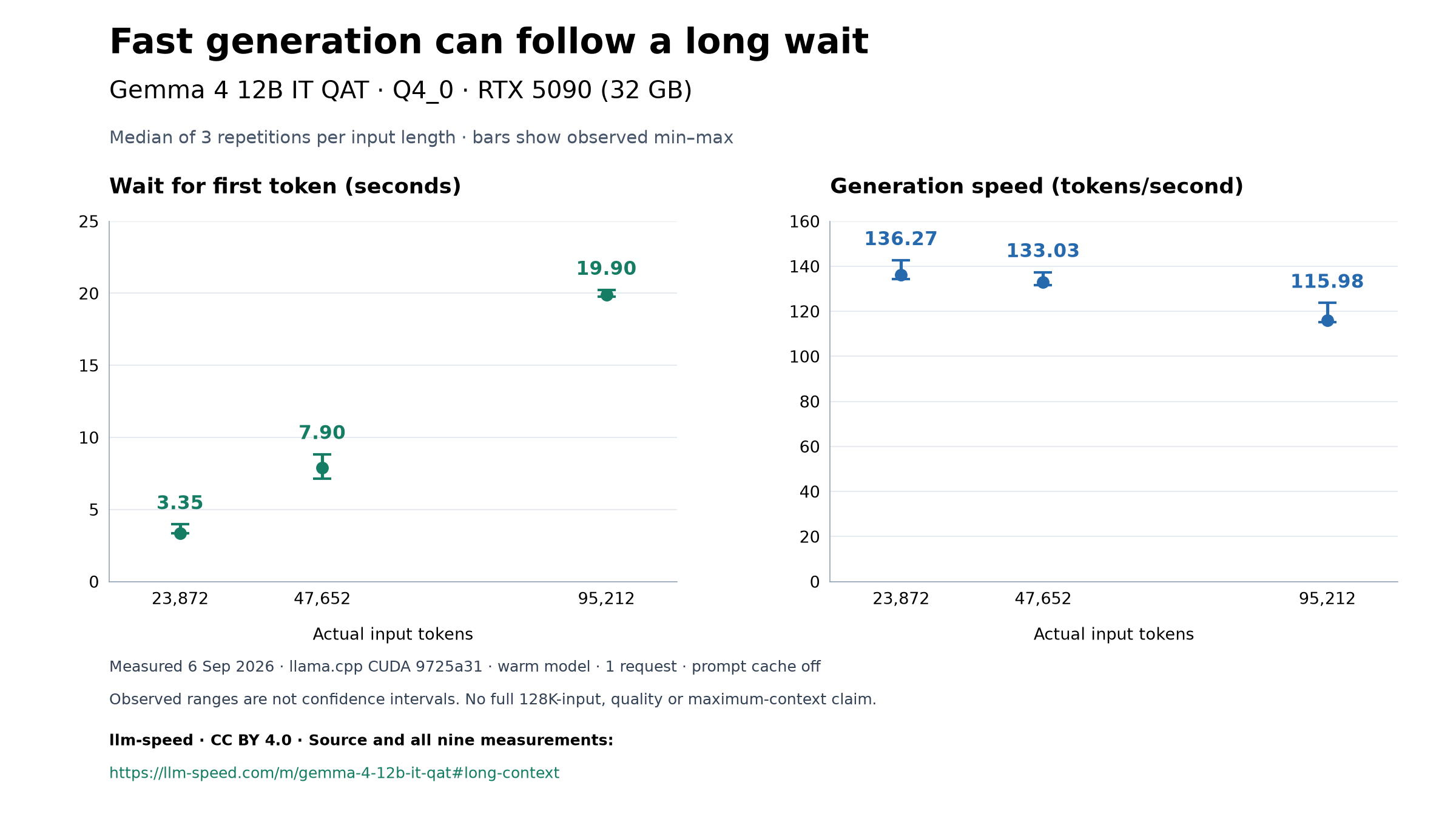
September 6 snapshot: a longer first-token wait can accompany fast generation. Separate axes start at zero; three repetitions describe this configuration, not a confidence interval or a quality score.
Download chart (PNG)Download chart (SVG)Download citationAll nine measurements (JSON)
Reuse under CC BY 4.0. Credit llm-speed and link to the study, test date and configuration. Identify any changes you make to the chart.
Median of three sequential runs; parentheses show observed minimum–maximum. Each row uses actual token usage, not estimated workload targets.
Scroll the table sideways for all measurements.
| Actual prompt tokens | First token (s) | Decode tok/s | Output tokens |
|---|---|---|---|
| 23,872 | 3.355 (3.334–3.964) | 136.27 (134.18–142.61) | 98 |
| 47,652 | 7.901 (7.123–8.833) | 133.03 (131.71–137.28) | 100 |
| 95,212 | 19.901 (19.765–20.224) | 115.98 (115.05–123.65) | 96 |
The server had 131,072 tokens of context configured. Workload targets of 32K / 64K / 128K use a character-count estimate; actual prompts were shorter. This is not a full 128K-input test or an answer-quality evaluation. Output cap was 256 tokens, with actual outputs shown above. Three repeats describe this setup, not a confidence interval.
Long-context settings and reproduction
RTX 5090 (32 GB), AMD Ryzen 7 9850X3D, 30 GB system RAM reported by WSL. CUDA runtime: llama.cpp 9725a31. One active request, all 49 layers on GPU, thinking off, model warm; other idle GPU services remained resident.
Pinned artifact: gemma-4-12b-it-qat-q4_0.gguf. SHA-256: 93567e57a8fe10b23569b9d9ec38cd005deedf71e29477c421a4b83f418a538b.
Runtime-reported model, context and compute allocation totaled 9,685 MiB (9.46 GiB), not measured peak whole-device memory. The 16,384-context chat test above used a different allocation.
Build the pinned runtime with CUDA, verify the artifact, then start this server on a free port. Replace the model filename with its local path:
llama-server --model gemma-4-12b-it-qat-q4_0.gguf --alias gemma-4-12b-it-qat-q4_0.gguf \
  --host 127.0.0.1 --port 8082 --n-gpu-layers 999 \
  --ctx-size 131072 --parallel 1 --no-cache-prompt --cache-ram 0 \
  --reasoning off --temp 0 --seed 42
The benchmark used unchanged suite-v1 long-context-decay prompts and timing, three sequential invocations. The isolated client was version 0.0.5 with fixes for streamed token usage and quantization parsing. Its exact source revision is internal and is not available through the public CLI repository. The command below documents the invocation; the published client may differ, so these instructions do not yet provide exact end-to-end reproduction:
LLAMA_CPP_SERVER_URL=http://127.0.0.1:8082 \
  llm-speed bench --backend llama.cpp \
  --model /path/to/gemma-4-12b-it-qat-q4_0.gguf --workload long-context-decay
Keep competing workloads idle and preserve normal services. Different drivers, clocks, system load and runtime builds can change timings. The configured capacity does not establish the model's maximum usable context.
Sources and reusable data
Download the dated September 6 snapshot: all nine measurements (CSV) or data, configuration and citation (JSON). Cite this long-context study with its test date and configuration.
Local runs (13 workload results)
Runs from contributors' own machines via MLX, llama.cpp, vLLM, exllamav2, or ollama. Signed on the submitter's hardware.
RTX 4090 (24GB) + AMD EPYC 7642 48-Core Processor (48c) + 252GB
| Workload | Backend | Quant | decode tok/s | prefill tok/s | TTFT | Run |
|---|---|---|---|---|---|---|
| chat-short | llama.cpp@8931 (9725a313b) | Q4_0 | 97.72tok/s | 1,109.0tok/s | 112ms | r_jfh0qkngw76 |
| chat-long | llama.cpp@8931 (9725a313b) | Q4_0 | 86.30tok/s | 1,743.0tok/s | 1,831ms | r_jfh0qkngw76 |
| concurrent-decode | llama.cpp@8931 (9725a313b) | Q4_0 | 95.49tok/s | no data | no data | r_jfh0qkngw76 |
| agent-trace | llama.cpp@8931 (9725a313b) | Q4_0 | 89.10tok/s | 2,305.0tok/s | 983ms | r_jfh0qkngw76 |
RTX 5090 (32GB) + AMD Ryzen 7 9850X3D 8-Core Processor (8c) + 30GB
| Workload | Backend | Quant | decode tok/s | prefill tok/s | TTFT | Run |
|---|---|---|---|---|---|---|
| long-context-decay | llama.cpp@1 (9725a31) | Q4_0 | 142.6tok/s | 7,115.8tok/s | 3,355ms | r_-lh-vczf7ik |
| long-context-decay | llama.cpp@1 (9725a31) | Q4_0 | 136.3tok/s | 7,161.0tok/s | 3,334ms | r_1srqmpjnkgd |
| long-context-decay | llama.cpp@1 (9725a31) | Q4_0 | 134.2tok/s | 6,022.4tok/s | 3,964ms | r_8q-uf-rq-gp |
| chat-short | llama.cpp@1 (9725a31) | Q4_0 | 141.1tok/s | 2,027.9tok/s | 59.7ms | r_v5arqmazf31 |
| chat-long | llama.cpp@1 (9725a31) | Q4_0 | 135.6tok/s | 5,147.7tok/s | 619ms | r_v5arqmazf31 |
| chat-short | llama.cpp@1 (9725a31) | Q4_0 | 139.5tok/s | 1,958.9tok/s | 61.8ms | r_c2podhe9qwc |
| chat-long | llama.cpp@1 (9725a31) | Q4_0 | 137.1tok/s | 5,118.0tok/s | 623ms | r_c2podhe9qwc |
| chat-short | llama.cpp@1 (9725a31) | Q4_0 | 137.3tok/s | 2,316.4tok/s | 52.2ms | r_8xmm65n1fhq |
| chat-long | llama.cpp@1 (9725a31) | Q4_0 | 135.6tok/s | 5,523.3tok/s | 577ms | r_8xmm65n1fhq |
Gemma 4 12B IT QAT on hardware
Request a gemma-4-12b-it-qat run
No measured run yet for these pairs. Vote for the one you want; the most-requested runs go first. See all requests.
We never sell or share your email. Privacy